1/4 of the memory footprint
Written natively in Swift, AppKit, and SwiftUI for macOS 13 Ventura and later. Stay snappy across large folders without watching RAM usage balloon.
Keep the power-user workflows you rely on—multi-pane tabs, a built-in Drop Stack, rule-based batch rename, and a folder-aware terminal—without high memory usage, subscription nags, forced online logins, or unanswered support tickets.
We’ll email when your beta invite is ready, along with founding launch pricing.
Which Path Finder feature should we ship next?
Longtime Mac power users don’t leave Path Finder because they stopped needing dual panes or Drop Stack—they leave because of bloat, licensing friction, and silence from support.
Written natively in Swift, AppKit, and SwiftUI for macOS 13 Ventura and later. Stay snappy across large folders without watching RAM usage balloon.
A local Mac utility shouldn’t demand a cloud account or nag you with subscription prompts. Pay once and own your copy cleanly.
Most dual-pane Mac alternatives drop the Drop Stack entirely. Quarterglass builds native Drop Stack staging right into the sidebar alongside up to 4 panes.
When a bug disrupts your daily file workflow, you shouldn’t be left guessing in dead forums. Support answers directly within 24 hours.
Dual panes, four-pane layouts, clickable breadcrumbs, Drop Stack staging, and an embedded terminal that follows your active directory.
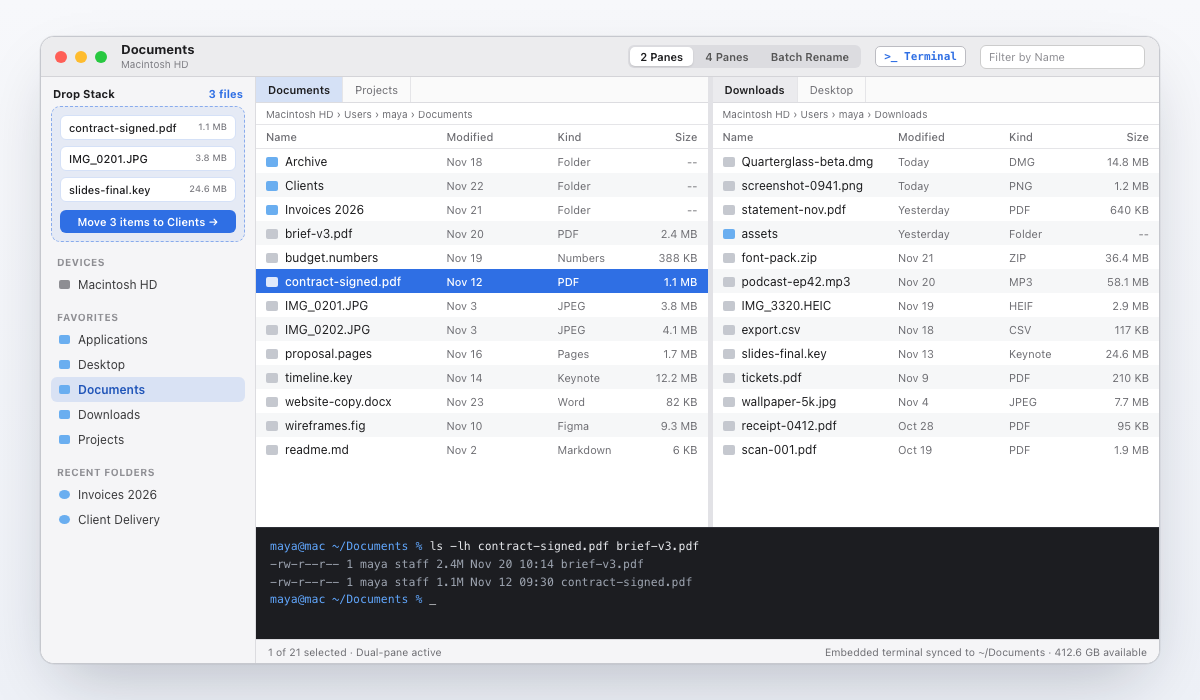
Every area measured honestly against Cocoatech’s published Path Finder feature list so you know exactly what works today and what ships next.
| Feature area | In Quarterglass today | Coming next |
|---|---|---|
| Panes & Drop Stack | ✓Up to 4 independent panes (5 layouts), folder tabs, Drop Stack staging, transfers, and file actions | Persistent stacks |
| Batch Rename | ✓Ordered rules, regex, numbering, case, dates, saved presets, live preview | EXIF and audio metadata |
| Terminal & macOS | ✓Embedded and external terminals synced to current folder, Finder reveal, hidden files, shortcuts | Automation, admin operations, secure deletion |
| File operations | ✓Create, open, info, share, rename, copy, duplicate, ZIP, move, symbolic links, Trash | Finder aliases, tags and ratings, attribute editing |
| Navigation & filtering | ✓Saved sidebar favorites, clickable breadcrumb paths, back/forward, instant name filter | Browsable path-component menus |
| Size Browser & Sync | ✓File sizes, available volume space, fast manual transfers between panes | Recursive folder sizes, disk usage view, difference analysis & reviewed sync |
| Preview & Layouts | ✓Native Quick Look, five pane layouts, modification-date groups | Persistent preview/info panels, rearrangeable modules, tag grouping |
Common questions from users migrating from Path Finder.
Yes. Quarterglass includes a native Drop Stack directly in the sidebar so you can gather files from scattered folders and move, copy, or ZIP them together. Persistent stacks across relaunches are next on our roadmap.
No. Quarterglass is a one-time purchase with no recurring subscription and no forced online account sign-in to browse local folders.
Quarterglass is engineered natively in Swift, AppKit, and SwiftUI to run at 1/4 of the memory usage of other Mac file managers, keeping multi-pane workflows responsive all day.
No. Quarterglass is an independent macOS app and is not affiliated with Cocoatech or Apple.
Join the beta waitlist for early access and founding one-time launch pricing—plus vote on which Path Finder parity features ship first.
We’ll write to with your beta invite and founding launch discount.