Dual-pane to 4-pane in one click
Choose from five pane layouts with independent tabs, clickable path bars, back/forward history, and instant name filtering per pane.
Stop lining up two Finder windows side by side every morning. Quarterglass gives you up to four tabbed panes in a single native Swift window—paired with Drop Stack staging, rule-based batch rename, and a terminal that opens right in your active folder.
We’ll write to with your beta invite and founding launch discount.
Vote for what ships next:
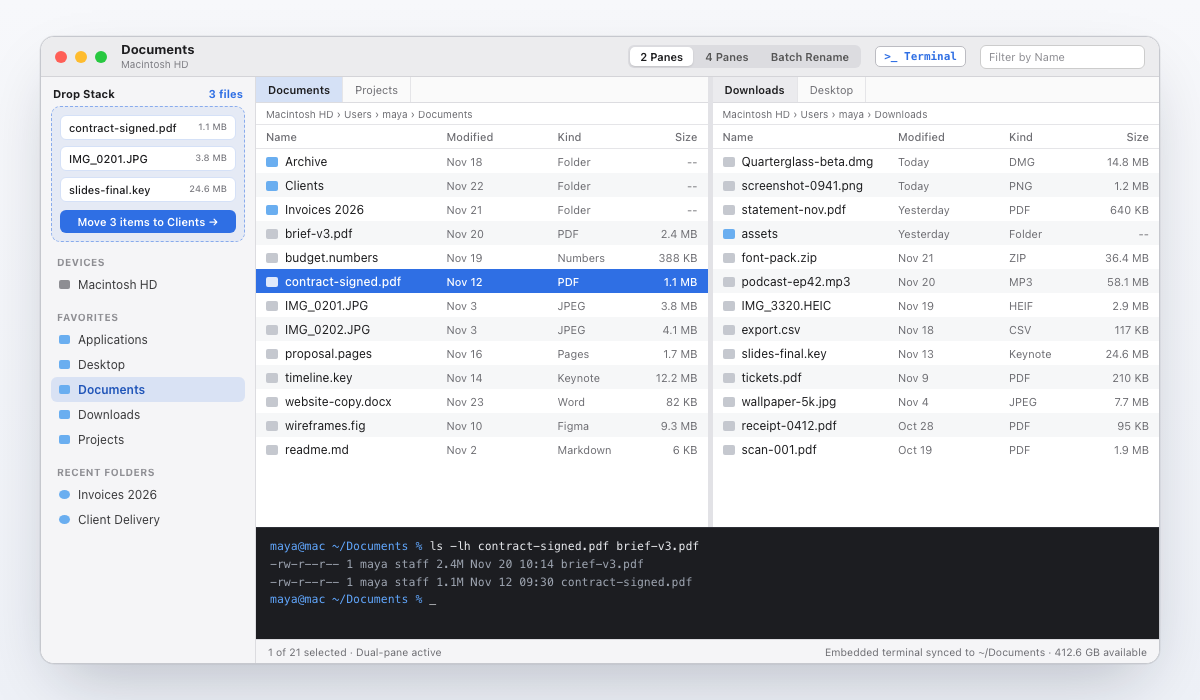
Every tool you reach for when organizing projects, photo exports, downloads, or repositories—inside one lightweight native window.
Choose from five pane layouts with independent tabs, clickable path bars, back/forward history, and instant name filtering per pane.
Stack find-and-replace, regular expressions, sequential numbering, case transforms, and date formats with reusable presets and instant preview before committing.
Open a terminal directly inside the folder you’re browsing—no more copying paths or running manual cd commands between Finder and Terminal.
Zero Electron wrappers or bloated caches. Quarterglass feels at home on macOS 13+ with Quick Look, hidden file toggles, symlinks, ZIP archiving, and fast native scrolling.
Quarterglass runs cleanly alongside Finder so you can use multi-pane tools whenever Finder slows you down. Also comparing Path Finder? See our switcher guide.
| Capability | Quarterglass | macOS Finder |
|---|---|---|
| Multi-pane views | ✓Five layouts up to 4 independent tabbed panes per window | Single pane per window (manual window tiling required) |
| Cross-folder staging | ✓Built-in Drop Stack drawer for gathering and batch transfers | None built in |
| Batch renaming | ✓Ordered multi-rule pipeline, regex, presets, and live preview | Single basic replace/add/format action at a time |
| Terminal access | ✓Embedded terminal panel synced to active folder + external terminal | Requires separate Terminal window or manual Services shortcut |
| Power file operations | ✓Symbolic links, instant name filtering, Delete key preference, ZIP | Limited to basic copy/move/alias operations |
Everything you need to know about running Quarterglass on your Mac.
Quarterglass includes five pane layouts supporting up to four independent folder panes at once, each with its own tabs, breadcrumb path, and instant name filter.
No—it runs cleanly alongside Finder. You can reveal any file in Finder at any time and drag folders from Finder straight into Quarterglass favorites or Drop Stack.
Yes. Built natively with Swift, AppKit, and SwiftUI, Quarterglass supports Quick Look previews, macOS sharing, hidden file toggles, and keyboard-first navigation.
Any Mac running macOS 13 Ventura or later.